
Python Decorators: A complete guide to decorators in Python
Quick answer: A Python decorator is a function that takes another function, wraps it with extra behavior, and returns the new version without changing the original code. Writing @timer above a function is shorthand for func = timer(func). Decorators work because Python functions are first-class objects (they can be passed and returned like any value) and because inner functions form closures that remember the original function. A well-written decorator uses *args and **kwargs to accept any arguments, returns the wrapped function’s result, and applies @functools.wraps to keep the original name and docstring. To pass settings, such as @timer(unit="ms"), you add an outer layer called a decorator factory. Multiple decorators stack bottom-up, so @a above @b means a(b(func)). Decorators can also be classes with a __call__ method (useful for keeping state), can wrap methods and whole classes, need an async wrapper for async functions, and power built-ins like @property, @staticmethod, @classmethod, and @functools.lru_cache. This guide explains each concept with one running example: a slow weather-fetching function that we time, log, count, and cache.
If you’ve seen something like @yo_i_am_decorating_this_func above a Python function and wondered what’s going on, you’re in the right place. Python decorators look like magic at first, but they’re built from a few simple ideas. In this guide we’ll take one small example and grow it step by step until you understand every part of how decorators work.
Our Running Example: A Slow Weather Fetcher
Here’s the function we’ll use for the whole post. It pretends to call a slow weather API:
import time

def fetch_weather(city):
    time.sleep(0.5)  # pretend this is a slow network call
    return f"Sunny in {city}"
Our goal is to measure how long fetch_weather takes without changing its code. That’s exactly what decorators are for.
Step 1: Functions Are Objects in Python
In Python, functions are first-class objects. You can store them in variables and pass them to other functions, just like numbers or strings:
get_forecast = fetch_weather       # no parentheses, so no call
print(get_forecast("Paris"))       # Sunny in Paris

def run(func, city):
    return func(city)

print(run(fetch_weather, "Tokyo")) # Sunny in Tokyo
Since a function can receive another function, it can also add behavior around it. That’s the core idea behind every decorator.
Step 2: Wrapping a Function with a Closure
Let’s write a function that takes fetch_weather, wraps it with timing code, and returns the new version:
def timer(func):
    def wrapper(city):
        start = time.perf_counter()
        result = func(city)
        print(f"{func.__name__} took {time.perf_counter() - start:.2f}s")
        return result
    return wrapper

fetch_weather = timer(fetch_weather)
fetch_weather("Paris")   # fetch_weather took 0.50s
Notice that wrapper uses func even after timer has finished running. That’s called a closure: an inner function that remembers variables from the function that created it. Closures are what let decorators hold on to the original function.
Step 3: The @ Decorator Syntax
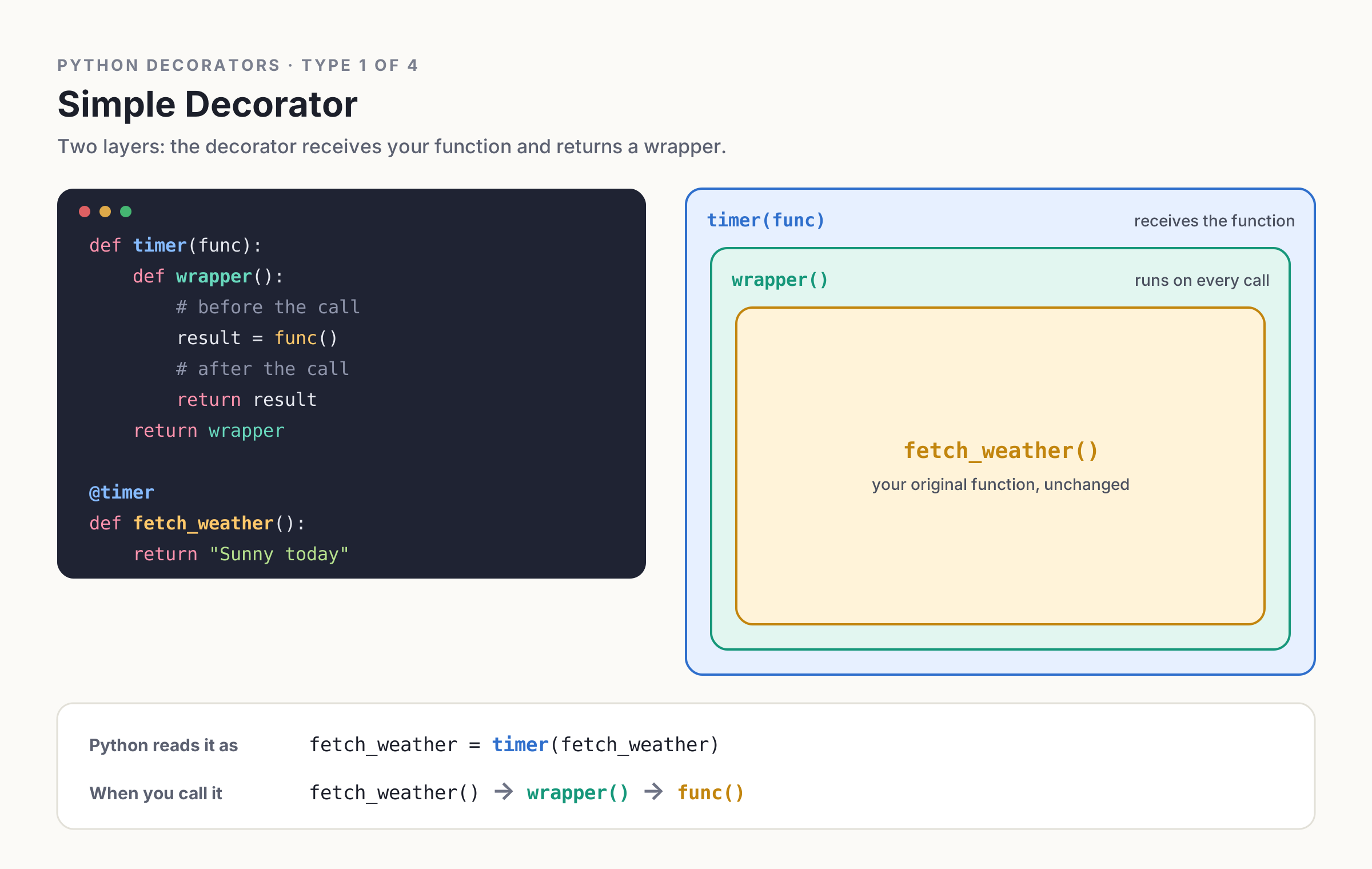
Writing fetch_weather = timer(fetch_weather) works, but Python gives us a cleaner shortcut:
@timer
def fetch_weather(city):
    time.sleep(0.5)
    return f"Sunny in {city}"
@timer means exactly the same thing: “define this function, then pass it through timer.” One thing to remember is that this happens when the function is defined, not when it’s called.
Step 4: Handling Any Arguments with *args and **kwargs
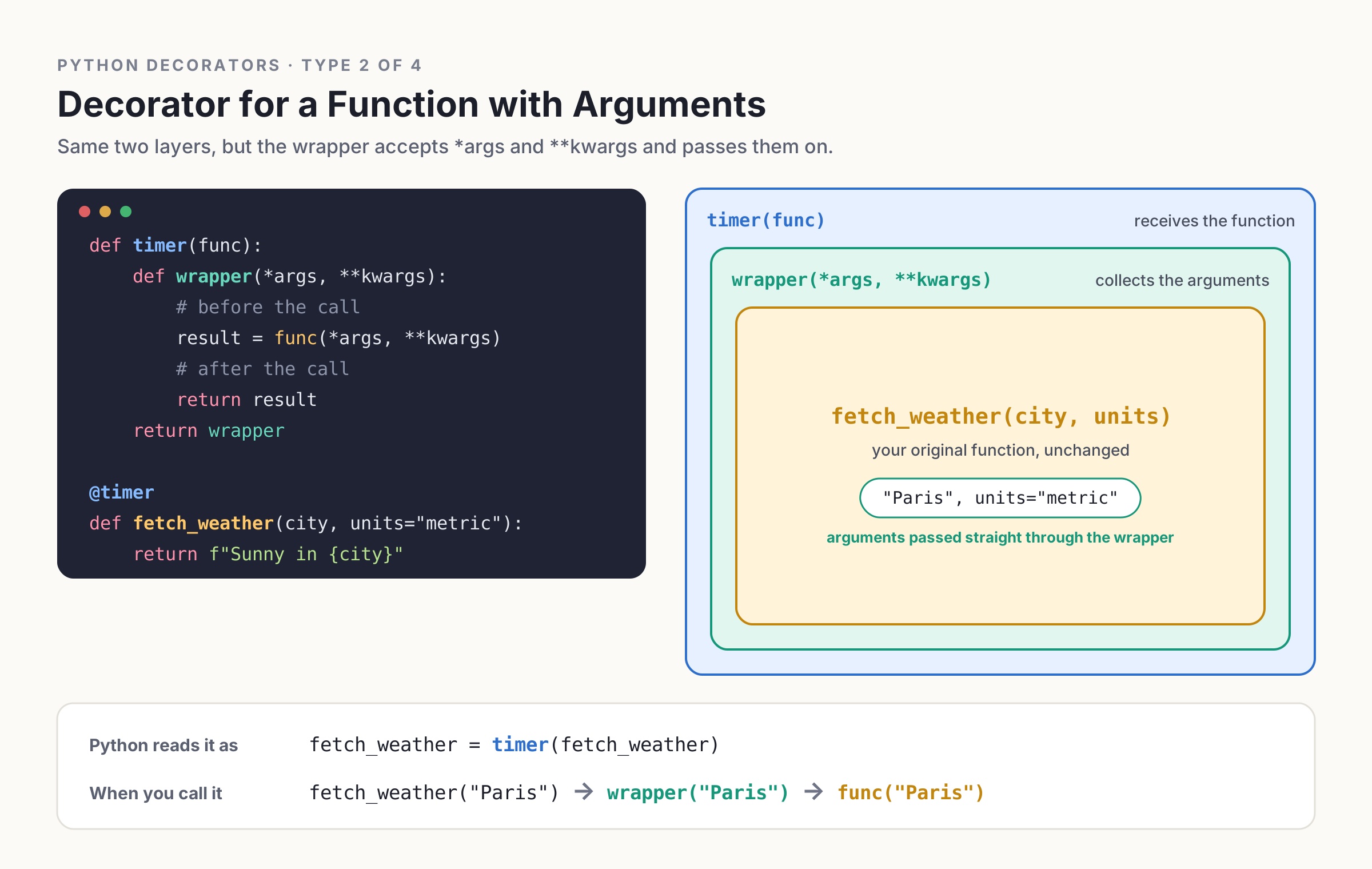
What if we add a units parameter to our fetcher? Our wrapper only accepts city, so it would break. The fix is to accept and pass along any arguments:
def timer(func):
    def wrapper(*args, **kwargs):
        start = time.perf_counter()
        result = func(*args, **kwargs)
        print(f"{func.__name__} took {time.perf_counter() - start:.2f}s")
        return result
    return wrapper

@timer
def fetch_weather(city, units="metric"):
    time.sleep(0.5)
    return f"Sunny in {city} ({units})"
Now timer works on any function. Always remember the return result line, or your decorated function will quietly return None.
Step 5: Keep Function Metadata with functools.wraps
There’s a sneaky problem. Try this:
print(fetch_weather.__name__) # wrapper (not what we want)
Our function lost its name and docstring, which makes debugging and documentation harder. The standard library fixes this with functools.wraps:
import functools

def timer(func):
    @functools.wraps(func)
    def wrapper(*args, **kwargs):
        start = time.perf_counter()
        result = func(*args, **kwargs)
        print(f"{func.__name__} took {time.perf_counter() - start:.2f}s")
        return result
    return wrapper
Now fetch_weather.__name__ is fetch_weather again. Make @functools.wraps a habit in every decorator you write.
Step 6: Python Decorators with Arguments
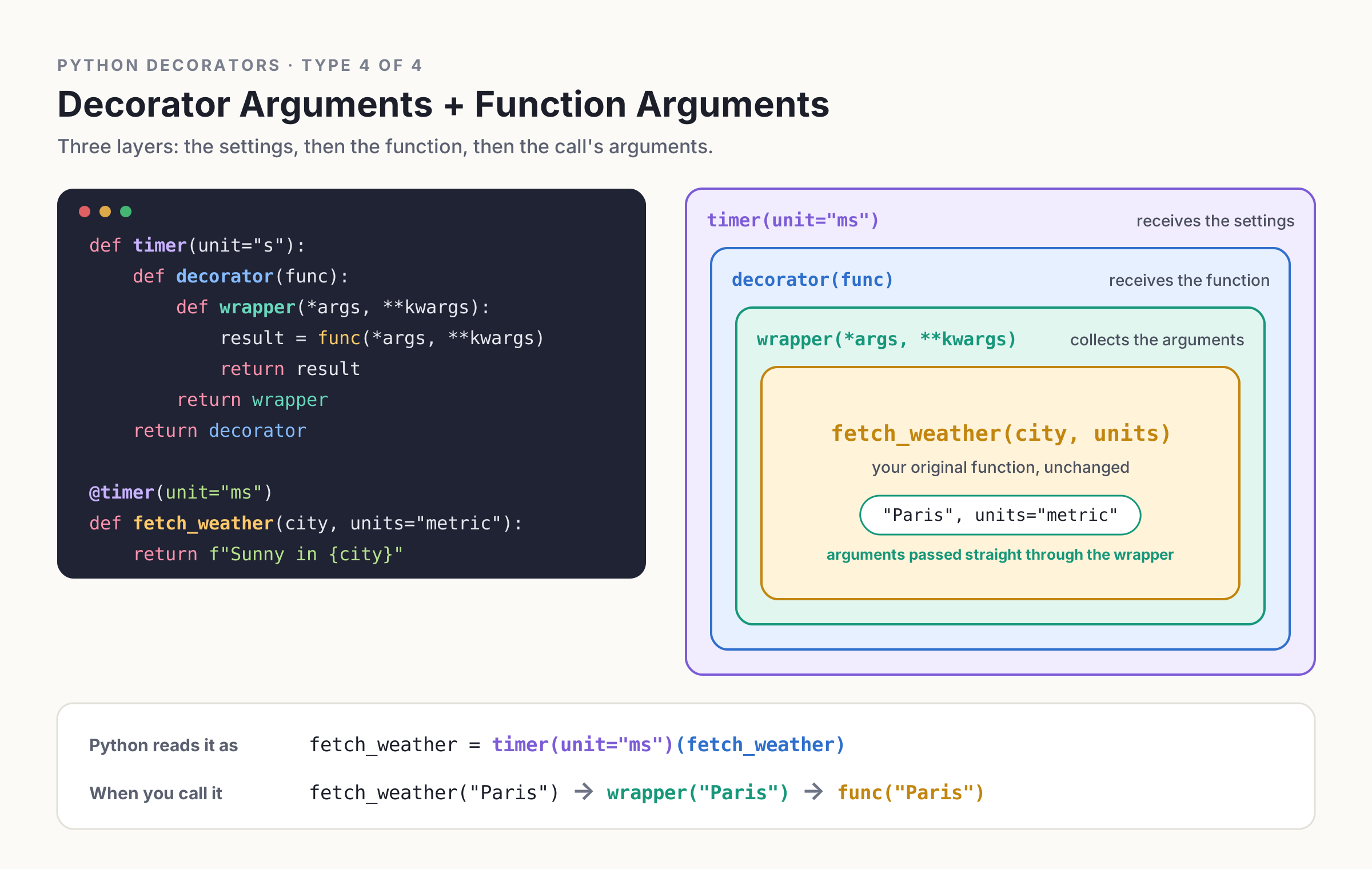
What if we want to choose the time unit, like @timer(unit="ms")? Since timer(unit="ms") runs first, it must return a decorator. That means adding one more layer, often called a decorator factory:
def timer(unit="s"):
    def decorator(func):
        @functools.wraps(func)
        def wrapper(*args, **kwargs):
            start = time.perf_counter()
            result = func(*args, **kwargs)
            elapsed = time.perf_counter() - start
            if unit == "ms":
                elapsed *= 1000
            print(f"{func.__name__} took {elapsed:.2f}{unit}")
            return result
        return wrapper
    return decorator

@timer(unit="ms")
def fetch_weather(city, units="metric"):
    time.sleep(0.5)
    return f"Sunny in {city} ({units})"

fetch_weather("Paris")   # fetch_weather took 500.12ms
Think of it as three layers: the outer one takes the settings, the middle one takes the function, and the inner one takes the call’s arguments. Since timer is now a factory, you’ll write @timer() with parentheses even when using the default unit.
Step 7: Stacking Multiple Decorators
Let’s add a second decorator that logs each call:
def log_calls(func):
    @functools.wraps(func)
    def wrapper(*args, **kwargs):
        print(f"Calling {func.__name__}{args}")
        return func(*args, **kwargs)
    return wrapper

@log_calls
@timer(unit="ms")
def fetch_weather(city, units="metric"):
    time.sleep(0.5)
    return f"Sunny in {city} ({units})"
Decorators apply bottom-up, so this equals log_calls(timer(unit="ms")(fetch_weather)). When you call the function, the outermost one (log_calls) runs first. Picture layers of an onion: the call goes in through each layer, and the result comes back out. Order matters, so think about which behavior should happen first.
Step 8: Class-Based Decorators for Keeping State
Any callable can be a decorator, including a class with a __call__ method. This is handy when you want to keep state, like counting how many times we’ve fetched the weather:
class CountCalls:
    def __init__(self, func):
        functools.update_wrapper(self, func)  # class version of @wraps
        self.func = func
        self.calls = 0

    def __call__(self, *args, **kwargs):
        self.calls += 1
        return self.func(*args, **kwargs)

@CountCalls
def fetch_weather(city):
    return f"Sunny in {city}"

fetch_weather("Paris")
fetch_weather("Rome")
print(fetch_weather.calls)   # 2
Step 9: Decorating Methods and Classes
Our function-based timer works on methods too, because self simply arrives inside *args:
class WeatherClient:
    @timer(unit="ms")
    def fetch(self, city):
        time.sleep(0.5)
        return f"Sunny in {city}"
Python also ships with built-in decorators you’ll see all the time. @property makes a method behave like an attribute, @staticmethod and @classmethod change what the method receives, and @functools.lru_cache caches results, which is perfect for repeated weather lookups:
@functools.lru_cache(maxsize=100)
def fetch_weather(city):
    time.sleep(0.5)
    return f"Sunny in {city}"
The second call for the same city returns instantly.
Decorators can even wrap classes. They receive the class instead of a function and usually return it after a small change:
def add_source(cls):
    cls.source = "Demo Weather API"
    return cls

@add_source
class WeatherClient: ...

print(WeatherClient.source)   # Demo Weather API
Step 10: Decorating Async Functions
If your weather fetcher is async, the wrapper must be async too and must await the original:
import asyncio

def async_timer(func):
    @functools.wraps(func)
    async def wrapper(*args, **kwargs):
        start = time.perf_counter()
        result = await func(*args, **kwargs)
        print(f"{func.__name__} took {time.perf_counter() - start:.2f}s")
        return result
    return wrapper

@async_timer
async def fetch_weather(city):
    await asyncio.sleep(0.5)
    return f"Sunny in {city}"

asyncio.run(fetch_weather("Paris"))
Common Decorator Mistakes to Avoid
Most decorator bugs come from a handful of slips: forgetting return result in the wrapper, forgetting return wrapper in the decorator, skipping functools.wraps, writing @timer when a factory needs @timer(), and putting work in the decorator body that should live inside the wrapper (it would run once at definition time instead of on every call).
Wrapping Up
Here’s the one idea to remember: @decorator above a function means func = decorator(func), and @decorator(args) means func = decorator(args)(func). Everything else builds on functions being objects and closures remembering their surroundings. Starting from a plain fetch_weather, we added timing, flexible arguments, preserved metadata, configurable units, logging, call counting, caching, and async support, all without touching the function’s own code. That’s the power of Python decorators.
FAQ
What is a decorator in Python?
A decorator is a function that takes another function and returns a new one with extra behavior, applied using the @ syntax.
Why use functools.wraps in a decorator?
It copies the original function’s name, docstring, and other metadata onto the wrapper, so debugging and documentation still work correctly.
How do I pass arguments to a Python decorator?
Add an outer function that accepts the arguments and returns the actual decorator, which is known as a decorator factory.